Data Connector Overview
Once you have defined a graph schema, you can load data into the graph.
This section provides an overview of how to configure TigerGraph to connect to different data sources, including data warehouses, cloud storage, streaming systems, and lakehouse platforms.
Connector Architecture Overview
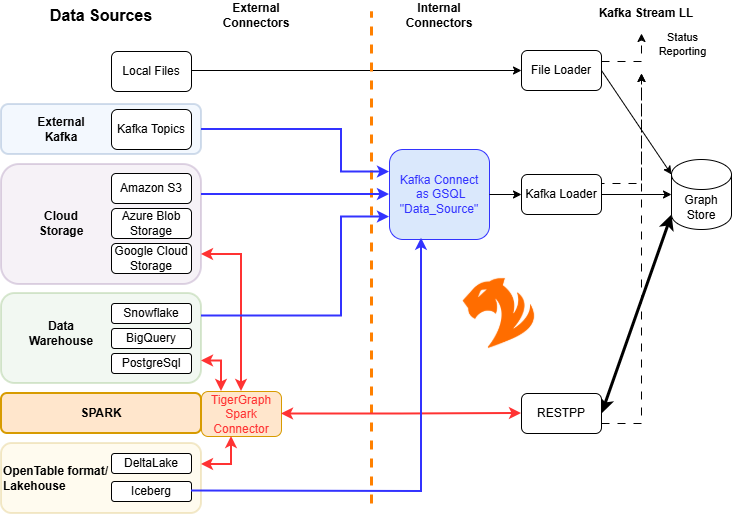
This diagram shows the supported data source categories, the connectors used to access them, and the TigerGraph components responsible for ingesting the data.
Data Source Categories
TigerGraph supports multiple categories of data sources, each accessed through a specific connector or integration method.
-
Local Files: Files located on the TigerGraph server can be loaded directly without defining a
DATA_SOURCEobject. This option typically provides the highest performance. -
External Sources (via Kafka Connect): External systems are accessed by defining a
DATA_SOURCEobject, which uses the Kafka Connect framework. Kafka Connect provides a distributed and fault-tolerant data pipeline.Using this approach, TigerGraph can treat external sources similarly to local files. Supported sources include:
-
Cloud storage (Amazon S3, Azure Blob Storage, Google Cloud Storage)
-
Data warehouses (Google BigQuery, Snowflake, PostgreSQL)
-
External Kafka clusters
-
Lakehouse platforms such as Apache Iceberg (via Kafka Connect)
See the pages for each connector for detailed configuration steps.
-
-
Lakehouse (via Spark or Kafka Connect): Lakehouse platforms combine features of data lakes and data warehouses.
TigerGraph supports:
-
Apache Iceberg via Kafka Connect
-
Apache Iceberg, DeltaLake (and other Spark-supported sources) via the Spark Connector
See Load from Apache Iceberg for details.
-
-
Spark: The TigerGraph Spark Connector integrates with Apache Spark to load data from Spark DataFrames or lakehouse storage systems into TigerGraph.
This approach allows you to leverage the broader Spark ecosystem and its supported data sources.
Loading Workflow
TigerGraph follows a consistent workflow for loading data, regardless of the source:
-
Specify a graph. Data is always loaded into a single graph. For example:
USE GRAPH ldbc_snb -
If using an external connector, define a
DATA_SOURCEobject.See:
-
Create a loading job.
-
Run the loading job.
Loading Jobs
A loading job defines how data is transformed into vertices and edges in the graph.
CREATE LOADING JOB <job_name> FOR GRAPH <graph_name> {
  <DEFINE statements>
  <LOAD statements>
}
The loading job definition includes:
-
A job name (
<job_name>) -
A target graph (
<graph_name>)
The body of the loading job consists of:
-
DEFINE statements: Create variables that reference data sources. These can represent files or external queries.
-
LOAD statements: Specify how input data fields map to vertices and edges.
| For detailed syntax and examples, see Creating a Loading Job. |